mirror of
https://github.com/d-fi/d-fi-core.git
synced 2025-12-14 16:33:43 +01:00

18 lines
536 B
Markdown
18 lines
536 B
Markdown
## Frequently Asked Questions (FAQ)
|
|
|
|
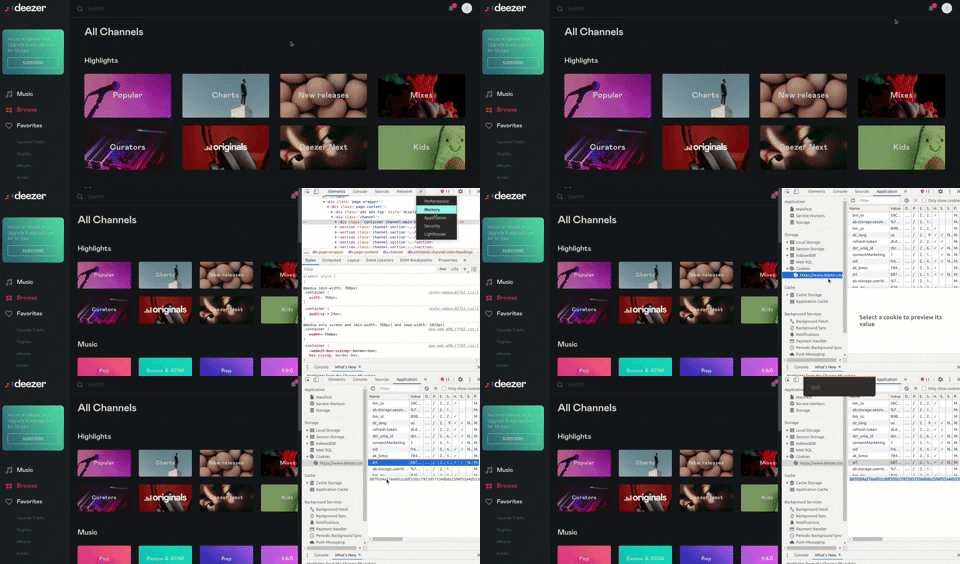
- How to get arl cookie?
|
|
|
|
> Open Google Chrome in PC
|
|
>
|
|
> - Go to www.deezer.com and log into your account
|
|
> - After logging in press F12 to open up Developer Tools
|
|
> - Go under the Application tab (if you don't see it click the double arrow)
|
|
> - Open the cookie dropdown
|
|
> - Select www.deezer.com
|
|
> - Find the arl cookie (It should be 192 chars long)
|
|
> - That's your ARL, now you can use it in the app
|
|
|
|
Here is a sample gif tutorial.
|
|
|
|
|